Schema Markup: How Local Businesses Use Structured Data for Google and AI
Schema markup is code you add to your website that tells Google, Bing and AI tools exactly what your business is, where it operates and how to reach you. Your site already shows your phone number, address and hours as text. Schema labels those facts so machines don’t have to guess.
For a local service business, schema is worth doing, but it isn’t magic. In our October 2026 study of Fairfield County service businesses, companies outside Google’s Map Pack actually used LocalBusiness schema slightly more often than the winners. And in a ChatGPT test, schema didn’t predict which businesses got recommended. Consistent listings did.
This guide explains what schema markup is, which types a local business should use, how to add LocalBusiness schema with sameAs links, what our study found, what schema can and can’t do for AI answers, which rich results still exist and how to fix errors.
Key Takeaways
- Use LocalBusiness schema, or a subtype like Plumber or HVACBusiness, on your homepage and location pages, with sameAs links to your official profiles.
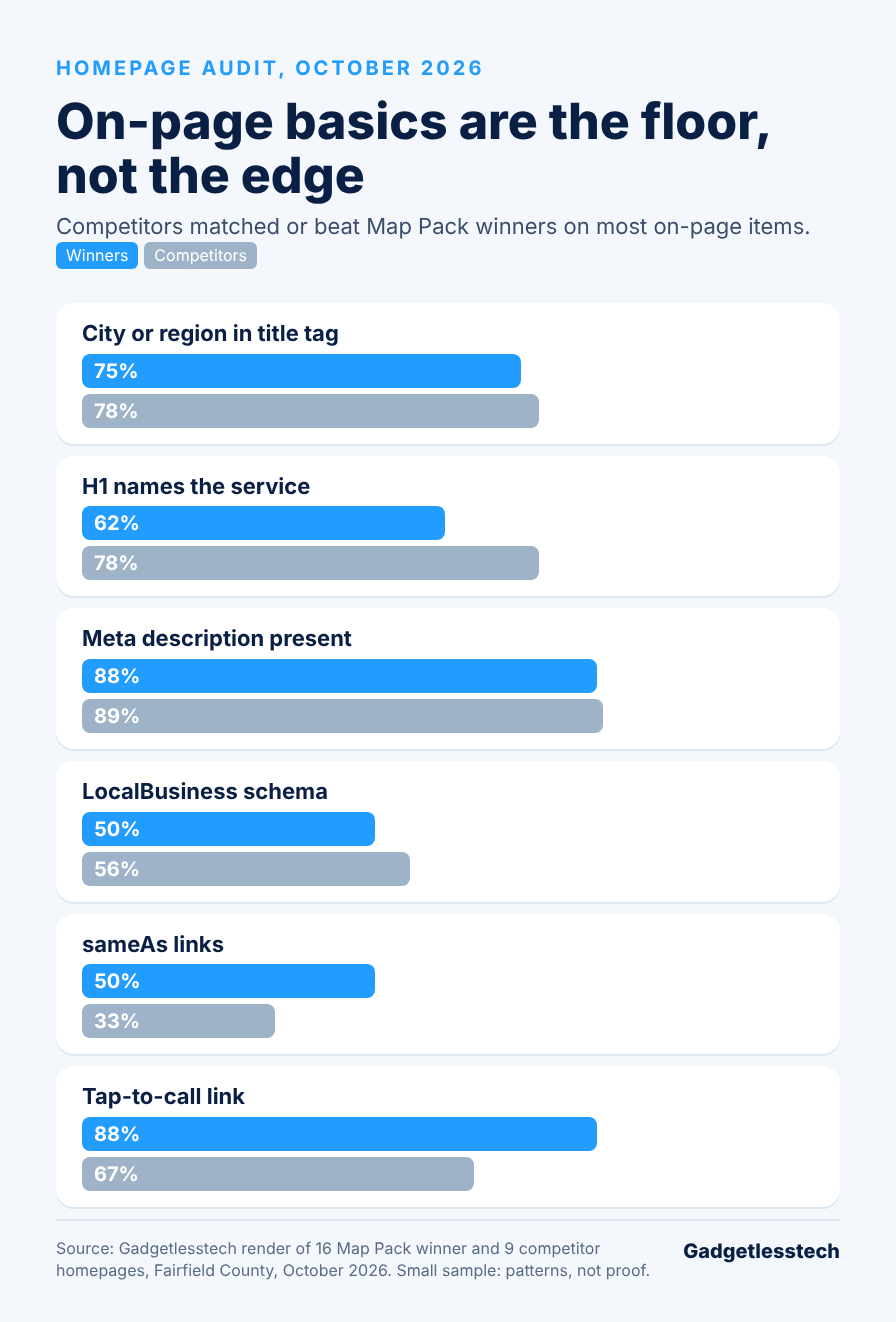
- In our study, LocalBusiness schema was on 50% of Map Pack winners’ homepages and 56% of competitors’ homepages, so it is hygiene, not a ranking lever.
- sameAs links showed a clearer gap: 50% of winners versus 33% of competitors.
- Schema didn’t decide who ChatGPT recommended in our test. Directory presence lined up better.
- Google ended FAQ rich results for all sites as of May 7, 2026, and self-written review stars don’t show for LocalBusiness pages.
What Is Schema Markup?
Schema markup is structured data written with the shared Schema.org vocabulary that labels the facts on a page for search engines. Google’s introduction to structured data recommends the JSON-LD format, a single block of code that sits in your page’s HTML and doesn’t change how the page looks to visitors.
Think of it as a label on a box. A visitor sees “Mon to Fri, 8 to 5.” Schema tells Google that those are your opening hours, that the number beside them is your phone and that the business is a plumber in Stamford, Connecticut.
There is no penalty for skipping schema, but you lose the clearest way to state your business facts in machine-readable form, and some search features need it.
Which Schema Types Should a Local Business Use?
A local business should use a small set of schema types that match its real pages and content.
| Schema Type | Where to Use It | What It Does |
|---|---|---|
| LocalBusiness (or a subtype such as Plumber, Electrician, HVACBusiness, RoofingContractor) | Homepage and location pages | States your name, address, phone, hours, service area and links to your official profiles |
| Organization | Homepage | States your brand name and logo; useful for businesses without a storefront |
| Service | Service pages | Describes each service you offer |
| BreadcrumbList | Every page with a menu path | Can show a breadcrumb trail in search results |
| Article | Blog posts and guides | States the headline, author and dates |
| Review / AggregateRating | Only where Google allows it | Star snippets don’t show for reviews a business collects about itself on LocalBusiness or Organization pages |
| FAQPage | Pages with real FAQs | No longer produces a visible rich result, but Google still uses it to understand the page |
Several types can live in one JSON-LD block. A homepage often combines LocalBusiness and BreadcrumbList.
How Do You Add LocalBusiness Schema With sameAs Links?
You add LocalBusiness schema by writing a JSON-LD block with your exact business details and a sameAs list of your official profile URLs, then placing it in your homepage HTML and testing it. Google’s local business structured data guide lists the supported properties.
- Use your exact business name as it appears on your Business Profile.
- Add your url, logo, telephone, full address, openingHours and areaServed.
- Add geo coordinates for your location if you have one.
- List your official profiles in sameAs: your Google Business Profile link, Facebook, Yelp, BBB and your trade directories. Use the exact, live URLs.
- Only mark up facts that also appear on the page. Google can take manual action on misleading markup.
- Test the page with the Rich Results Test before and after you publish.
Here is a simple example with placeholder details:
{
  "@context": "https://schema.org",
  "@type": "Plumber",
  "@id": "https://www.exampleplumbing.com/#business",
  "name": "Example Plumbing Co",
  "url": "https://www.exampleplumbing.com/",
  "logo": "https://www.exampleplumbing.com/logo.png",
  "telephone": "+1-203-555-0100",
  "address": {
    "@type": "PostalAddress",
    "streetAddress": "100 Main Street",
    "addressLocality": "Stamford",
    "addressRegion": "CT",
    "postalCode": "06901",
    "addressCountry": "US"
  },
  "openingHours": "Mo-Fr 08:00-17:00",
  "areaServed": ["Stamford", "Greenwich", "Norwalk"],
  "sameAs": [
    "https://www.facebook.com/exampleplumbing",
    "https://www.yelp.com/biz/example-plumbing-stamford",
    "https://www.bbb.org/us/ct/stamford/profile/example-plumbing"
  ]
}
On WordPress, SEO plugins such as Rank Math can generate most of this for you. Check the output with the Rich Results Test either way.
What Our Study Found About Schema and Local Rankings
Schema markup did not separate Google Map Pack winners from everyone else in our October 2026 study. We checked the homepages of Map Pack top-three businesses and nearby competitors outside the pack in Stamford, Norwalk and Bridgeport.
| Signal | Map Pack Winners | Competitors Outside the Pack |
|---|---|---|
| LocalBusiness schema on the homepage | 50% | 56% |
| sameAs links to official profiles | 50% | 33% |
| Median Google reviews | 81 | 14 |
The competitors outside the pack used LocalBusiness schema slightly more than the winners did, so schema in itself is clearly not why someone ranked. sameAs links seemed to have a bigger gap than schema. Reviews had the largest gap of them all.
Takeaway: treat schema as part of building a solid, clean website, a baseline every business should meet. Reviews, your Business Profile and genuine local links are what create the majority of your ranking power. Note: this data set is very small, and while we can see patterns in the data, it does not provide proof of how things work.
Does Schema Markup Help You Appear in AI Answers?
Schema markup helps machines connect your business facts, but in our test it did not decide which businesses AI recommended. In October 2026 we asked ChatGPT for the best HVAC company, plumber, electrician and roofer in Stamford.
- Businesses with schema and sameAs links were not named more often than businesses without them.
- Two electricians with full schema and more than 300 reviews each were left out.
- ChatGPT printed the wrong website for two HVAC companies it recommended.
- Its answers were built from directory listings such as Expertise.com and BestProsInTown.
For AI visibility, consistent listings matter more than writing the right code. Use the same business name, website, street address and phone number across all directories, post a clear summary of your key facts in plain view on your site and use schema’s sameAs property to connect them. See our guide to entity SEO to learn how these signals work together, or let our AI search optimization services do it for you.
Which Rich Results Can Schema Still Earn?
Schema can still earn some rich results, but Google has removed or narrowed several over the past few years. Check Google’s search gallery for current eligibility before you build anything new.
- Still available: breadcrumbs, organization logo, article details and review snippets for eligible content types such as products.
- FAQ rich results: limited to well-known government and health sites in August 2023, then ended for all sites as of May 7, 2026. Google says it still uses FAQPage markup to understand pages, so existing markup doesn’t need removing.
- HowTo rich results: removed in 2023.
- Review stars for your own business: since 2019, Google doesn’t show star snippets on LocalBusiness or Organization pages for reviews the business collects about itself, including embedded review widgets.
For local service businesses, that means the main payoff from schema today is clarity, not flashy search features.
How Do You Test and Fix Schema Errors?
You test schema with Google’s free tools and fix errors at the source, then recheck after every site change.
- Rich Results Test: shows whether a page’s markup is valid and eligible for rich results.
- Schema Markup Validator: checks your code against the Schema.org vocabulary.
- Search Console: its enhancement reports show markup errors across your whole site.
The most common problems we see:
- Missing required properties, such as an address or name.
- Business details in the schema that don’t match the visible page or your Business Profile.
- Broken or outdated sameAs links.
- Markup describing things that aren’t on the page.
- Stray commas or quotes that break the JSON-LD.
Conclusion
Schema markup is worth adding. That includes LocalBusiness or a subtype on your home page and location pages, sameAs links to your real profiles, and clean, validated code. Keep it in perspective, though. In our research it was the floor, not the edge, and it didn’t decide AI recommendations. Instead, reviews from customers, your Business Profile and consistent listings did. The remainder of the basics are covered in our on-page SEO checklist.
Want your structured data and listings checked? Request a free SEO4GEO audit from Gadgetlesstech in Stamford, CT. It compares your business with your top three Google Maps competitors across seven pillars and shows you what to fix first.
Frequently Asked Questions
FAQs
- About the Author
- Latest Posts

Kevin Rhodes is the founder and lead of Gadgetlesstech, a digital marketing and SEO agency based in Stamford, Connecticut. He started Gadgetlesstech in 2010 as a consumer electronics e-commerce venture, then transitioned in 2014 toward web development and full-service digital marketing.
Today, under his leadership, the company helps businesses grow through search engine optimization, content marketing, custom web design (especially WordPress), and strategic digital marketing campaigns. Kevin is known for a hands-on approach to SEO and marketing strategy, and for building online visibility and lead generation for his clients.