
Website Speed: Why It Matters for Calls and How to Fix a Slow Site
Website speed is how quickly your pages load and respond when someone visits, and for a local service business it decides whether a visitor taps your phone number or goes back to Google. Most of your customers find you on their phones, often in a hurry. If your page stalls or jumps around, they call the next company.
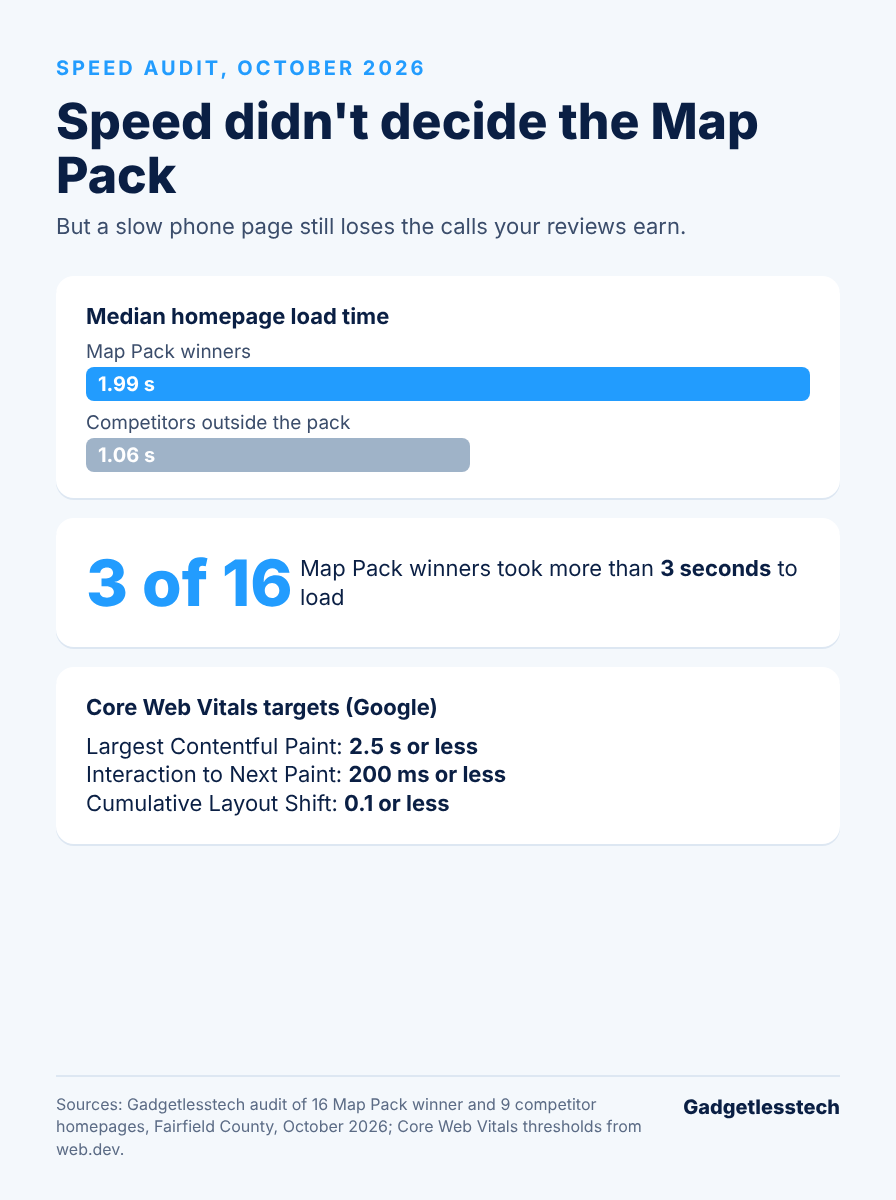
Here is what surprised us. In our October 2026 study of Fairfield County service businesses, the companies winning Google’s Map Pack actually had slower homepages than the competitors they beat. Speed didn’t buy their rankings. It does still protect your calls once people land on your site.
This guide explains how website speed is measured, how much it affects Google rankings, what our study found, how to test your site, what slows local business websites down and how to make yours faster.
Key Takeaways
- Google’s Core Web Vitals targets are Largest Contentful Paint of 2.5 seconds or less, Interaction to Next Paint of 200 milliseconds or less and Cumulative Layout Shift of 0.1 or less.
- Google uses Core Web Vitals in its ranking systems, but relevance and helpful content matter more.
- In our study, Map Pack winners’ homepages loaded in a median of 1.99 seconds versus 1.06 seconds for competitors outside the pack.
- Winners did lead on reviews (median 81 versus 14) and tap-to-call links (88% versus 67%).
- Treat speed as conversion insurance: fix oversized images, heavy scripts and layout shifts on your top service pages first.
What Is Website Speed and How Is It Measured?
Website speed is measured by how fast your main content appears, how quickly the page reacts when someone taps it and how stable the layout stays while it loads. Google tracks these with three Core Web Vitals:
| Metric | What It Measures | Good Score |
|---|---|---|
| Largest Contentful Paint (LCP) | How fast the main content appears | 2.5 seconds or less |
| Interaction to Next Paint (INP) | How fast the page responds to a tap or click | 200 milliseconds or less |
| Cumulative Layout Shift (CLS) | How much the page jumps around while loading | 0.1 or less |
Google judges these at the 75th percentile of real visits, so most of your visitors need a good experience, not just the ones on fast Wi-Fi. INP replaced an older metric, First Input Delay, in March 2024.
You’ll see two kinds of data in speed tools. Lab data comes from a simulated test. Field data comes from real Chrome users visiting your site. Field data is what Google uses, so give it more weight when the two disagree.
Does Website Speed Affect Google Rankings?
Website speed does affect Google rankings, but only as one signal among many. Google’s page experience documentation says its ranking systems use Core Web Vitals, but there is no single page experience score, and good scores don’t guarantee top rankings. A fast page won’t outrank a more relevant, more helpful one.
Think of speed as a tiebreaker for rankings and a big deal for conversions. Google points to research such as Deloitte’s Milliseconds Make Millions study, which found that a 0.1-second mobile speed improvement lifted conversions by 8.4% for retail sites and 10.1% for travel sites. Those weren’t local service sites, but the lesson carries over: small delays cost you actions.
What Our Study Found About Speed and Local Rankings
Our study found that faster websites did not win the Map Pack. In October 2026 we rendered and timed the homepages of 16 Google Map Pack top-three businesses and 9 nearby competitors outside the pack in Fairfield County.
| Measure | Map Pack Winners | Competitors Outside the Pack |
|---|---|---|
| Median homepage load time | 1.99 seconds | 1.06 seconds |
| Tap-to-call phone link | 88% | 67% |
| Median Google reviews (all 59 businesses studied) | 81 | 14 |
Three of the 16 winners’ homepages took more than 3 seconds to load. The winners were slower, yet they still held the top three spots, because reviews, their Business Profile and proximity mattered more. The winners were also more likely to make calling easy with a tap-to-call link.
So don’t expect a speed project to move you into the Map Pack on its own. Do expect it to keep more of the visitors your reviews and profile bring in. One caveat: this was a small snapshot, so it shows patterns, not proof.
How Do You Test Your Website Speed?
You test your website speed with free Google tools, starting with the pages that bring in customers.
- PageSpeed Insights: enter a page URL to see field data from real users and a lab report with specific fixes.
- Search Console’s Core Web Vitals report: shows which groups of pages pass or fail across your whole site.
- Lighthouse in Chrome DevTools: runs a lab test on any page while you work on it.
Testing tips:
- Test the mobile version first, since most local searches happen on phones.
- Test your top service and town pages, not just your homepage.
- Run each lab test a few times and use the middle result, because single runs vary.
- Retest after every major change, such as a new plugin or a redesigned page.
What Slows Down Local Business Websites?
The things that slow down local business websites are usually the same handful of problems:
- Oversized images. Photos uploaded straight from a phone or camera, often several megabytes each.
- Heavy page builders and sliders that load lots of code for visual effects.
- Too many plugins, each adding scripts and styles.
- Third-party widgets such as chat tools, review feeds, maps and tracking scripts.
- Web fonts that load several weights and styles.
- Images without set dimensions, which make the page jump as they load.
- Slow or crowded shared hosting and no caching.
Check your service pages for these, not just the homepage. Homepages often get the most attention while the pages customers land on from search stay heavy.
How Do You Make Your Website Faster?
By reducing the amount of data loaded on each page of your website and optimizing which items load first, you can improve your website’s loading speed. The best place to begin is the biggest time wasters on your top service pages.
- Resize and compress images to the size they actually display, and serve modern formats like WebP.
- Lazy-load images and video below the fold, but not the main image at the top of the page.
- Set width and height on images and embeds so the layout doesn’t shift.
- Turn on caching and use a content delivery network.
- Remove plugins and scripts you don’t use, and delay the ones you need, such as chat widgets.
- Limit web fonts to one or two families and preload the main one.
- Upgrade hosting if your server is slow to respond.
- Keep a tap-to-call button visible at the top of every mobile page.
If you are building a new website, our guide to SEO web design covers how to build speed into your design from the beginning. Our team also builds custom websites for local service businesses.
Conclusion
The impact of website speed on local service businesses is different than you might think. In our study it wasn’t the factor that determined who won the Map Pack; a business’s review strength and its Business Profile were. However, if a page loads slowly or has a lot of jumps, the business will lose many of the customers its reviews attracted. Test your top service pages. Fix oversized images, heavy scripts and layouts that shift as the page loads, and keep a tap-to-call button easily accessible. Our SEO fundamentals guide shows where speed fits among the other key elements.
Want to see how your site compares? Request a free SEO4GEO audit from Gadgetlesstech in Stamford, CT. It compares your business with your top three Google Maps competitors across seven pillars and shows you what to fix first.
- About the Author
- Latest Posts

Kevin Rhodes is the founder and lead of Gadgetlesstech, a digital marketing and SEO agency based in Stamford, Connecticut. He started Gadgetlesstech in 2010 as a consumer electronics e-commerce venture, then transitioned in 2014 toward web development and full-service digital marketing.
Today, under his leadership, the company helps businesses grow through search engine optimization, content marketing, custom web design (especially WordPress), and strategic digital marketing campaigns. Kevin is known for a hands-on approach to SEO and marketing strategy, and for building online visibility and lead generation for his clients.